Phone Says No SIM Card: How to Diagnose the Problem

On this page
When a mobile says No SIM card, it usually means the phone cannot recognise an inserted physical SIM or an enabled SIM profile. Start with a restart and then check whether the card is seated correctly. A worn card, damaged tray, disabled SIM setting or temporary software fault can cause the message. No SIM is not the same diagnostic message as No service, Emergency calls only or a blocked mobile-network connection. Knowing which appears on screen can save unnecessary trips to a shop or attempts to change unrelated settings.
Separate a Missing SIM from a Missing Signal
A phone that recognises your Jazz, Zong, Ufone or other operator SIM but shows no signal has a different starting problem from a phone that does not detect the card at all. A recognised SIM can still be affected by network coverage, account restrictions, an inactive subscription, roaming settings or device-specific network limitations. A SIM that is not detected may never reach those network checks.
Look at the actual wording. If Android displays a SIM not inserted message, focus on recognition and card seating. If it displays your operator name but no bars, check network availability. If the phone asks for a SIM PIN or PUK, do not guess repeatedly; contact the operator for the correct recovery process. If there are two physical slots, note whether SIM 1, SIM 2 or both are affected. If the phone supports eSIM, do not remove a physical tray expecting to fix an inactive digital profile.
Samsung Pakistan’s August 2026 No SIM guide describes recognition checks under the phone’s status information on supported Galaxy models. Its menu labels are helpful examples, not universal Android navigation instructions.
Begin with Low-Risk Checks
Restart the device through the normal power menu and allow it to finish starting. Check that Airplane mode is off. If the SIM is recognised after restarting, see whether calls and mobile data now work; there is no need to proceed to reset steps. If the message returns intermittently, record when it appears, such as after travel, a fall or a SIM change.
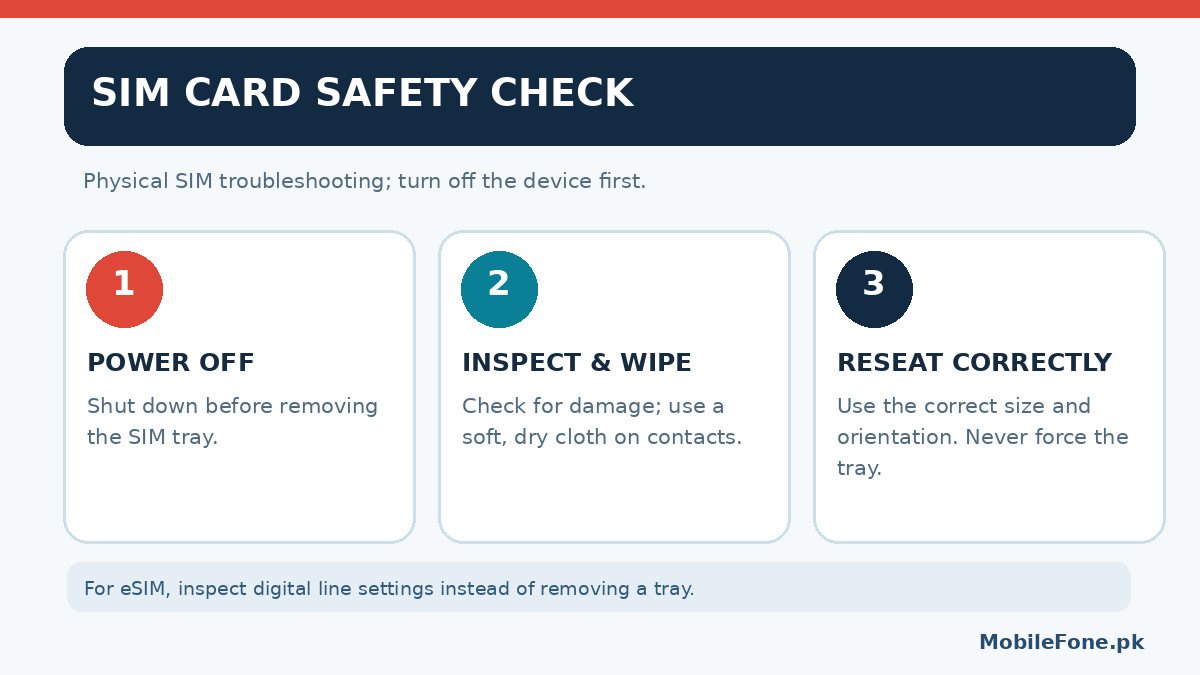
With a physical SIM, switch the phone off before removing the tray. Use the correct SIM-eject tool in the designated opening, without forcing the tray or poking nearby microphone holes. Carefully inspect the SIM for bends, cracks, corrosion or worn contacts. If it is dirty, Samsung recommends a gentle wipe using a soft, dry cloth. Avoid scraping the gold contacts or applying household liquids.
Place the card in the correct orientation and size specified for the handset. A cut-down or badly adapted SIM can sit unevenly; never force it into a slot. Fully insert the tray and start the phone. A bent tray, liquid damage or visibly broken connector is a reason to stop and obtain repair advice, not to repeatedly push harder.
Use a SIM Swap Test to Locate the Likely Cause
One careful comparison can be more informative than ten random settings changes. If you have permission and access to another unlocked, compatible phone, try your SIM in that handset. If it also fails to register, the card or operator provisioning deserves attention. If it works there but not in yours, focus on your phone, tray, supported SIM settings or hardware.
When safe and practical, test a different known-working SIM in your original phone. If that card works, replacement or reactivation of your own SIM may be the next step. If no known-working card is detected, the device side becomes more suspect. These are clues, not final proofs: devices differ by regional compatibility, SIM size, eSIM support and network restrictions.
Make notes of which SIM worked in which phone and slot. In a busy Pakistani mobile market, a written result is more useful at a carrier franchise or service counter than saying only that the signal disappears sometimes. Keep your SIM secure during testing because it can receive sensitive messages and account-verification codes.
Check SIM Settings Before Network Resets
If the phone can see the SIM but it appears disabled, open the device’s SIM or mobile-network manager. On different Android versions, this may be listed under Connections, Network & Internet, Mobile network or SIM management. Confirm that the relevant line is enabled. With dual-SIM phones, make sure you are checking the intended slot and not mistaking the inactive second line for a broken card.
On supported Galaxy phones, Samsung suggests checking SIM card status under Settings > About phone > Status information, then using built-in Samsung Members diagnostics if available. Some operator services restrict a SIM from activating in a new phone, so a franchise may need to confirm the account state. Do not enter unverified access-point-name settings copied from social media; an APN affects data configuration and does not repair a physically unreadable SIM card.
Only after simpler checks, consider the manufacturer’s Reset mobile network settings option if the issue appears configuration-related. This is not a full factory reset, but it can remove existing mobile-network preferences and may require reconnection or reconfiguration. Read your device’s warning before proceeding. Samsung documents that this operation cannot simply be undone. Menu positions and reset scope vary, so follow the exact model’s current support guide.
Where PTA Status and the Mobile Operator Fit In
For a phone used in Pakistan, device registration or network authorisation can matter when a phone recognises a SIM but cannot connect to a mobile network. It does not justify assuming every No SIM message is a PTA issue. Diagnosis should first establish whether the card itself is visible to the operating system.
Avoid websites or apps claiming to repair PTA status, change IMEI information or unlock an account for a fee. Device eligibility and official registration are separate administrative questions that should be checked only through current official government channels. Do not send your IMEI, CNIC, SIM PIN or verification codes to strangers offering to fix a network message.
If your SIM is physically recognised but calls still fail, contact the operator using its verified helpline or an authorised franchise. Explain whether the issue is No SIM, No service, mobile data only or emergency calls only. These details direct the representative to the appropriate account or network checks.

When a Replacement SIM or Repair Makes Sense
A SIM that fails in multiple compatible phones should be assessed by the issuing operator. A replacement SIM may require the registered account holder and appropriate identification, according to the operator’s current process. Do not assume a third-party shop can legally replace a SIM or verify your identity. If one slot fails but another reads the same card, ask a qualified technician to inspect that slot or its tray.
If the phone has suffered liquid exposure, has a visibly damaged tray or stops recognising every tested SIM, do not attempt to clean internal connectors with metal tools. A service centre can investigate hardware, software and possible warranty coverage. Ask first whether their procedure requires resetting the phone and whether your photos or other local data are at risk.
What to Do Next
Start by identifying the exact error, restarting and reseating the card carefully. Then use a controlled SIM swap test to separate a damaged SIM from a phone-side fault. Check SIM-manager settings before resetting network configuration. When the SIM is recognised but the network is unavailable, involve the operator and official registration checks instead of treating the problem as a broken tray. This order avoids unnecessary purchases and protects personal account information.

Related reading
 Mobile Problems & FixesAndroid Phone Running Slow: What to Check FirstNovember 14, 2026
 Mobile Problems & FixesPhone Keeps Restarting: Common Causes and Safe FixesNovember 14, 2026
 Mobile Problems & FixesPhone Turns On but Screen Stays BlackNovember 14, 2026
 Mobile Problems & FixesMobile Speaker Not Working During CallsNovember 14, 2026