SIM Card Detected but No Network Signal

On this page
A SIM can be detected by your phone without receiving a network signal. Detection means the handset can read enough information to recognise the card or profile; service also requires network registration, compatible radio settings, a working subscription and coverage. The most useful first test is whether the same SIM connects in another compatible phone, followed by whether a known-working SIM connects in yours. Before swapping anything, turn off airplane mode and check that the SIM is enabled.
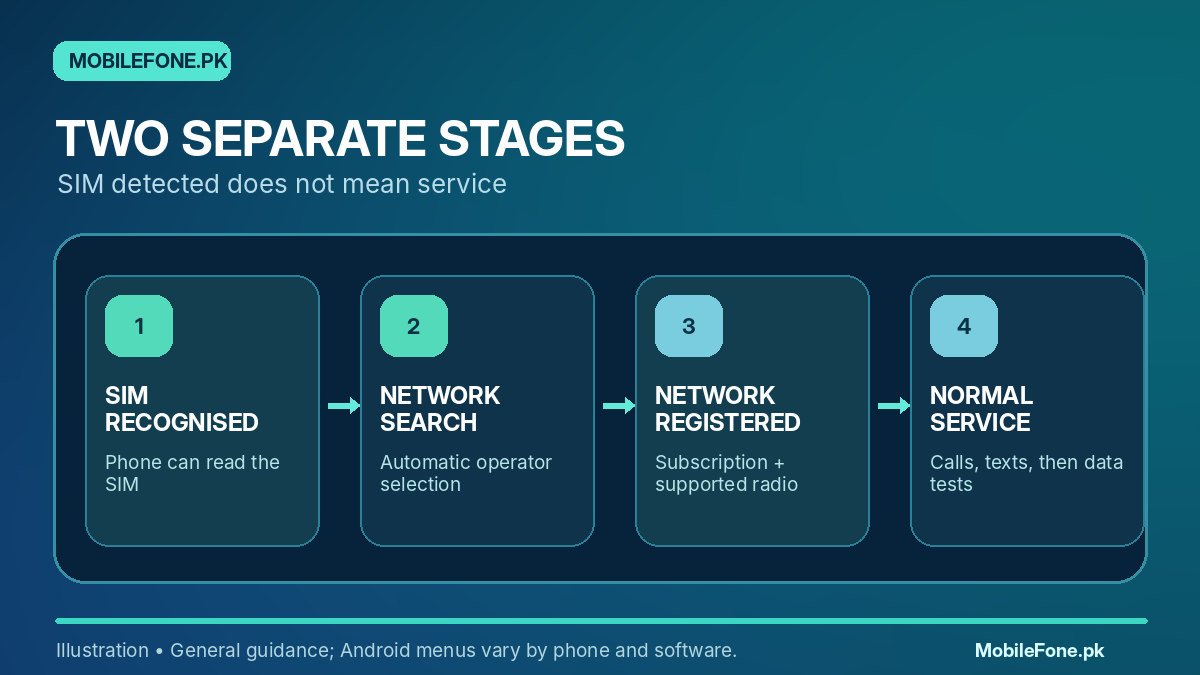
SIM recognition and network registration are different stages
A phone may display the operator name or a SIM label in Settings yet show empty bars, “No service” or a crossed-out signal symbol. That does not automatically imply broken SIM contacts: the handset has already recognised at least part of the SIM. The missing stage may be selecting and registering on a carrier network. Google’s mobile-network settings guide explains that selected operators and network options depend on device, Android version and subscription.
Pay attention to timing. If the signal vanished after you travelled, changed a network mode or inserted a new SIM, those details are clues. If the problem started immediately after physical damage, hardware is a more serious possibility. None of these observations proves a single cause without a controlled check.
| Observation | What it suggests | Next step |
|---|---|---|
| SIM appears in Settings, network bars absent | The card can be read but network registration may fail | Confirm coverage, SIM status and automatic selection |
| Same SIM fails in a second working phone | Card/account/operator fault is plausible | Ask the operator to inspect activation and SIM condition |
| Multiple active SIMs fail only in this phone | Handset configuration, lock or radio fault is plausible | Verify exact model and test network settings |
| Signal returns in another area | Local coverage or temporary outage is plausible | Check operator coverage and maintenance |
| Calls work but mobile data fails | Data configuration or subscription issue, not total signal loss | Check default data SIM, APN and active plan |
Start with the settings least likely to cause harm
- Disable airplane mode and wait briefly for the modem to search again.
- Confirm that the SIM or eSIM line is enabled in the phone’s network or SIM-manager screen.
- Restart the device normally; do not erase the handset.
- Check preferred network mode. Use a recommended automatic setting where the manufacturer supports it.
- Turn off Wi-Fi temporarily when examining the cellular indicator, so it is clear whether mobile service is present.
- Test the same operator in a different location and ask the carrier about a local outage.
For Samsung Galaxy devices, Samsung Pakistan documents network-mode options, checking mobile settings and resetting the mobile network. Google also notes that menu labels and available network types differ by region and model. A phone stuck on a 5G-only or other restricted mode may fail where the selected service is unavailable; returning to an automatic configuration is a safer first response than experimenting with hidden menus.
The swap test: change one variable at a time
Use a known-working compatible SIM and a second working phone if available. First test the affected SIM in the second phone. Then try the known-working SIM in the problem phone. Keep the test location similar and do not change several settings between trials. If your handset is dual-SIM, repeat with one slot at a time if the manufacturer supports that arrangement; SIM-slot damage is one possibility, but a single failed swap does not prove it.
Never force a tray, trim the card to fit or scrape contacts with metal. If you spot bent tray pins, liquid damage or visible corrosion, stop and consult an authorised or qualified repair service. Samsung’s SIM-recognition guide treats card condition and carrier services as separate considerations. With eSIM, do not delete the profile merely to perform this test; reactivation may require operator assistance.

Think about coverage, operator activation and handset lock
On a newly activated SIM, the operator may need to finish account or line provisioning. In a weak-signal location, signal can appear and disappear even when the card is perfectly functional. Check whether other users of the same carrier have service at your location. If they do and your SIM fails in more than one device, ask the operator to check the subscription rather than paying for a handset repair first.
An imported phone may also lack some locally useful bands, or it may be carrier-locked. Confirm the exact model number rather than relying on the brand name or a web listing that groups regional variants together. The MobileFone latest phone catalogue can help you identify a model before checking manufacturer technical documentation. A device that works on one operator but not another is not necessarily defective.
How PTA status fits into this diagnosis
If the device is imported or used in Pakistan, check its actual IMEI or IMEIs through the DIRBS device verification channels. A regulatory restriction is one possible explanation for failed local service, but the message “SIM detected” or “No signal” does not itself identify a PTA problem. Treat that question separately from radio-band compatibility and service activation.
The MobileFone fact-checking policy explains why an individual phone’s PTA status must not be assumed from a model listing. The official IMEI result matters more than advertisements claiming that a whole model is approved. Never pay for unverified IMEI patches, unofficial unlocks or suspicious links that ask for sensitive identity information.
When a network reset makes sense
If coverage, account status and physical SIM tests look normal, a mobile-network settings reset may restore a corrupted configuration. Record any custom APN or important carrier settings first. On newer Pixels, the menu may be Settings > System > Reset options > Reset mobile network settings; on Galaxy phones it can be Settings > General management > Reset > Reset mobile network settings. Exact labels vary. Do not select “Erase all data,” and be aware that broader reset options can remove remembered Wi-Fi or Bluetooth settings.
Take the swap-test results to your operator or service centre if the fault persists. The key is to establish whether failure follows the SIM, stays with the phone or changes with the location. That distinction saves more time than repeatedly restarting the handset without learning anything new.

Related reading
 Mobile Internet & SIMDual-SIM Settings Explained for Android UsersNovember 14, 2026
 Mobile Internet & SIMWhy Can’t My Phone Receive Verification SMS?November 14, 2026
 Mobile Internet & SIMMobile Internet Connected but Not WorkingNovember 14, 2026
 Mobile Internet & SIMJazz APN Settings for Android: How to ConfigureNovember 14, 2026