Fast Charging Not Working on Android

On this page

If fast charging stops working on Android, check the complete setup: the phone’s supported charging mode, a compatible charger, a suitable cable and the relevant settings. A USB-C plug or a high wattage printed on an adapter does not establish compatibility. Test with the screen off at a moderate temperature, then change one accessory at a time. If charging is intermittent, the connector is damaged or a moisture warning appears, address that problem before chasing higher speed.
Confirm what fast charging means for your model
Find the exact model code in Settings and check the manufacturer’s specifications. Similar names can hide different charging capabilities. The Redmi 13C model listing is a useful starting point; Xiaomi’s Pakistan specifications document 18W PD charging, with a 10W adapter listed in the box and a warning that regional contents vary. The included adapter may therefore explain slower charging. Check the actual accessories supplied with your unit.
A different Android model may use a different mode and limit. Before applying advice meant for a newer flagship to a Samsung Galaxy A04, confirm the actual handset and its compatible accessories. A software setting cannot add charging hardware the device does not have.
Also separate slower-than-expected charging from no battery gain. If the percentage rises steadily but the fast-charge label is missing, you are investigating speed or compatibility. If the percentage remains flat, check load, temperature, charging limits and the basic connection first.
Match the charging protocol, not just the wattage
The charger, cable and phone must support the charging arrangement being used. Google lists compatible USB Power Delivery and Programmable Power Supply adapters in its Pixel charging guidance. Those recommendations apply to Pixel; they should not be treated as a universal accessory prescription for every Android brand.
Xiaomi explains that an adapter without its supported proprietary charging protocol may deliver less than the phone’s advertised charging capability. Its slow-charging guidance recommends the appropriate official accessories. A charger that works well with one phone can therefore charge another at a lower rate without either phone being broken.
| What you have | What it does not prove | What to verify |
|---|---|---|
| A high-wattage adapter | That the phone supports its fast-charge mode | Compatible protocol and the model’s charging requirements |
| A cable that fits the port | That it supports the required current and charging mode | Manufacturer-recommended cable specification and condition |
| A multiport charger | That one connected phone receives the adapter’s total rating | Output available from that port with other devices attached |
| A computer USB port | That the port supports the phone’s fast charging | Compare a compatible wall adapter |
For a multiport adapter, read its own output table rather than assuming the headline rating belongs to every port simultaneously. Ask a seller to confirm compatibility with the exact model, and keep the receipt. Avoid paying for a larger wattage number when the required charging mode remains unspecified.

Check the charging setting your software actually provides
On supported Galaxy phones, Samsung Pakistan documents Settings, Battery, Charging settings, then Fast charging. Its fast-charging setup guide says labels vary by model and software. Disconnect the charging cable before changing the switch where that version requires it.
Older Galaxy software may put the controls under Battery and device care, Battery, More battery settings. Samsung describes that alternative in its wired-charging checks. The absence of a particular switch does not by itself prove a fault.
On Xiaomi phones, check only settings documented for your exact model. Some supported devices offer a charging-boost option, but it is not present on every Redmi or every software release. Xiaomi’s quick-charge troubleshooting also stresses suitable accessories and moderate temperature. Do not enter service menus or install modified software to manufacture a missing option.
Change one accessory, then compare
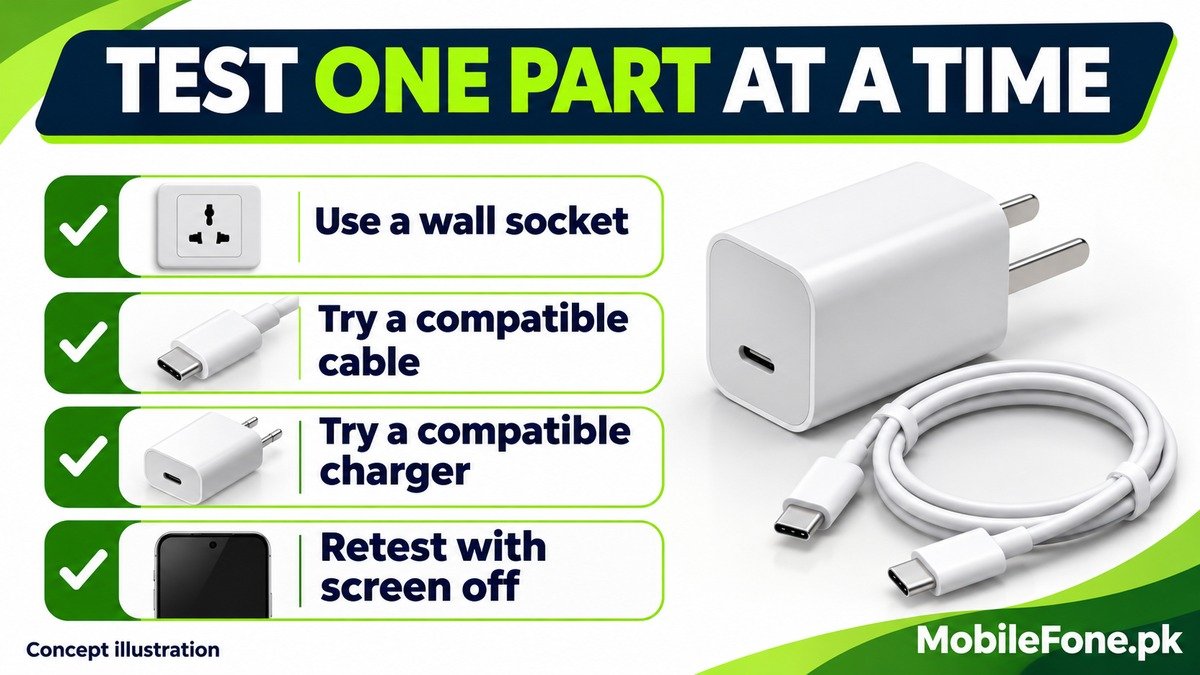
Use a repeatable check rather than repeatedly unplugging different combinations at random. Start below any configured charge limit and keep the phone out of direct sunlight. You do not need to drain it to zero for this comparison.
- Use a secure wall socket and the correct compatible charger-and-cable pair. Disconnect other devices from a shared adapter during the comparison.
- Lock the screen and stop demanding activities such as gaming, camera recording or hotspot use.
- Note the starting battery level, time and charging message, then allow a short observation period without repeatedly waking the display.
- If the result is poor, replace only the cable with a known-good compatible one and repeat under similar conditions.
- Then test another known-good compatible charger, keeping the other conditions similar. Record which change helps.
A cable working with a different low-power device does not prove it can support this phone’s faster mode. Likewise, a fast-charge notification is a status message, not a calibrated measurement of watts reaching the battery. Use comparable battery-level changes to decide whether the practical problem remains.
Account for temperature, screen use and a nearly full battery
Charging speed varies during a session. Xiaomi notes that charging slows near full and changes with temperature and usage. Heavy activity also consumes power while the charger is connected. Compare results at similar battery levels, rather than comparing one attempt near empty with another near full.
Samsung’s slow or interrupted charging guidance explains that excessive temperature can slow or pause charging. Let the phone return to a comfortable indoor temperature and avoid covering it with bedding. Trying to force higher speed defeats the purpose of its protection.
Stop when the connection needs inspection
Do not continue testing with a frayed cable, damaged adapter, loose port or moisture alert.
Unplug the charger and inspect the port in good light. Use qualified service if contamination, corrosion or damage is difficult to assess.
- Do not insert metal objects or cleaning liquids into the port.
- Follow a moisture warning instead of repeatedly reconnecting the cable.
- A connector that works only while held at an angle needs inspection.
Samsung’s fast-charging troubleshooting includes supported cable-charging diagnostics and service escalation. Give support the model, software version, adapter model, cable type and results of the one-part-at-a-time comparison. That record helps distinguish an accessory mismatch from a phone that needs repair.

Related reading
 Battery & ChargingWhy Does My Phone Battery Drain Overnight?November 14, 2026
 Battery & ChargingPhone Charging but Battery Percentage Not IncreasingNovember 14, 2026
 Battery & ChargingPhone Gets Hot While Using Mobile DataNovember 14, 2026
 Battery & ChargingWhy Does a Phone Stop Charging at 80%?November 14, 2026